


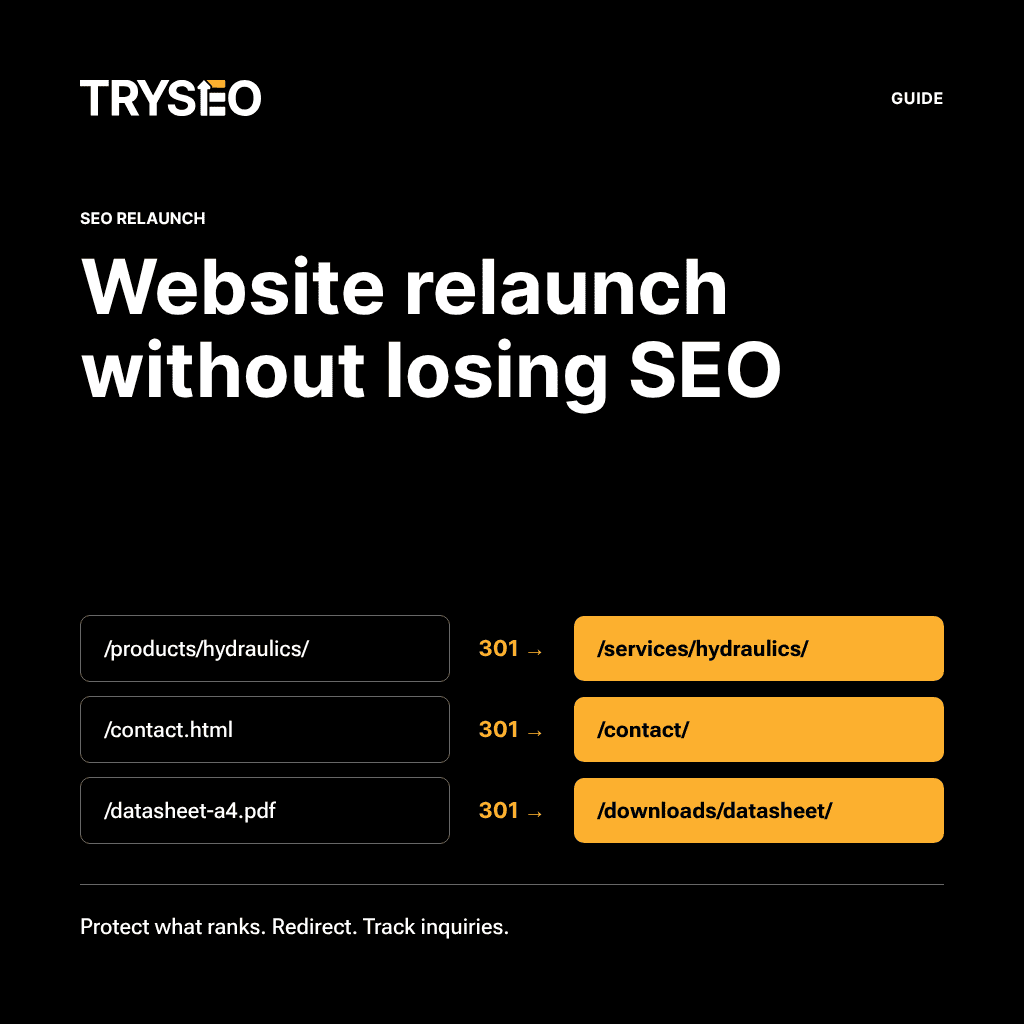
In a nutshell: Relaunch without losing leads
- Before an SEO relaunch, compile an inventory of pages that currently drive leads, rankings, and backlinks. Only with this list can you measure performance drops after going live.
- Every valuable legacy URL requires a permanent, server-side redirect to the matching new page—retained for at least one year, according to Google's site move documentation.
- Before going live, audit the new website from a search engine's perspective. This includes ensuring there is no noindex directive, no block in robots.txt, and canonical tags on the new URLs.
- Only indexed pages are eligible for these AI responses, according to Google's guidance on AI Overviews and AI Mode.
- Ranking fluctuations after a migration are normal. If inbound inquiries drop, first compare the pages from your inventory list before and after the relaunch in Google Search Console.
What gets lost during an SEO relaunch
A website relaunch must not cost you leads. An SEO relaunch is a website relaunch planned with search engines in mind. Design changes and a new URL structure are implemented, while rankings and traffic remain intact.
A website relaunch migrates your commercial value to new URLs. Every page that generates leads today needs a dedicated place on the new website—and a direct path from its old URL. Whatever gets left behind without an address will no longer be found by Google. And what is no longer on the website cannot be cited by answer engines.
An SEO relaunch therefore hinges on a single question: Are the pages driving your incoming pipeline moving over? Design, CMS, and navigation can change. But valuable content and URL equity must arrive safely on the new website.
These assets are tied to the old website and will be lost without a clear plan:
- ranking URLs that receive no redirect
- backlinks pointing to legacy URLs
- copy trimmed down or eliminated to accommodate the new design
- internal links leading to dead ends
- title tags and meta descriptions rewritten from scratch with no reference to the legacy baseline
- indexability, if a noindex tag from the staging phase is left behind
Some fluctuation is simply part of any migration. According to Google, rankings fluctuate while pages are recrawled and reindexed. For small and medium-sized websites, search results usually reflect the new URLs within a few weeks; larger sites take longer. Visibility then stabilizes.
A loss of visibility becomes permanent when a page loses its destination during the migration. Consider this scenario: A manufacturer migrates its portfolio to new product URLs. After launch, the old URLs return a 404 error. Inquiries generated through those pages dry up. In sales, nobody connects the drop to the relaunch.
How structure and design impact rankings right from the start is detailed in our guide on web design and SEO. This guide focuses on migrating a website that already generates business inquiries.
Busch-Hydraulik: Relaunch as a starting point
A well-prepared relaunch can drive inquiries. That is demonstrated by our case study B2B SEO with Busch-Hydraulik. Busch-Hydraulik is a mid-sized manufacturer from the Harz region producing hydraulic systems and power units.
The project began with a complete website relaunch. SEO was part of the architecture planning right from the start. Search engine optimization was built into the relaunch process long before the first page went live.
The result, as documented in our case study: organic visits grew by more than 2,000 percent within six months of launch. But for inbound pipeline, another metric matters: Since 2020, incoming orders have consistently originated from organic search.
For your relaunch, this means: Going live can be the catalyst for new business inquiries. The prerequisite is that page inventory, redirects, and tracking are fully established beforehand.
Which pages drive leads today?
Before the relaunch comes the page inventory. This list documents which pages generate inquiries, rankings, and backlinks. Without it, you won't know what went missing after go-live. Google recommends mapping old URLs to new URLs prior to the migration. The page inventory serves as the operational baseline for your entire plan.
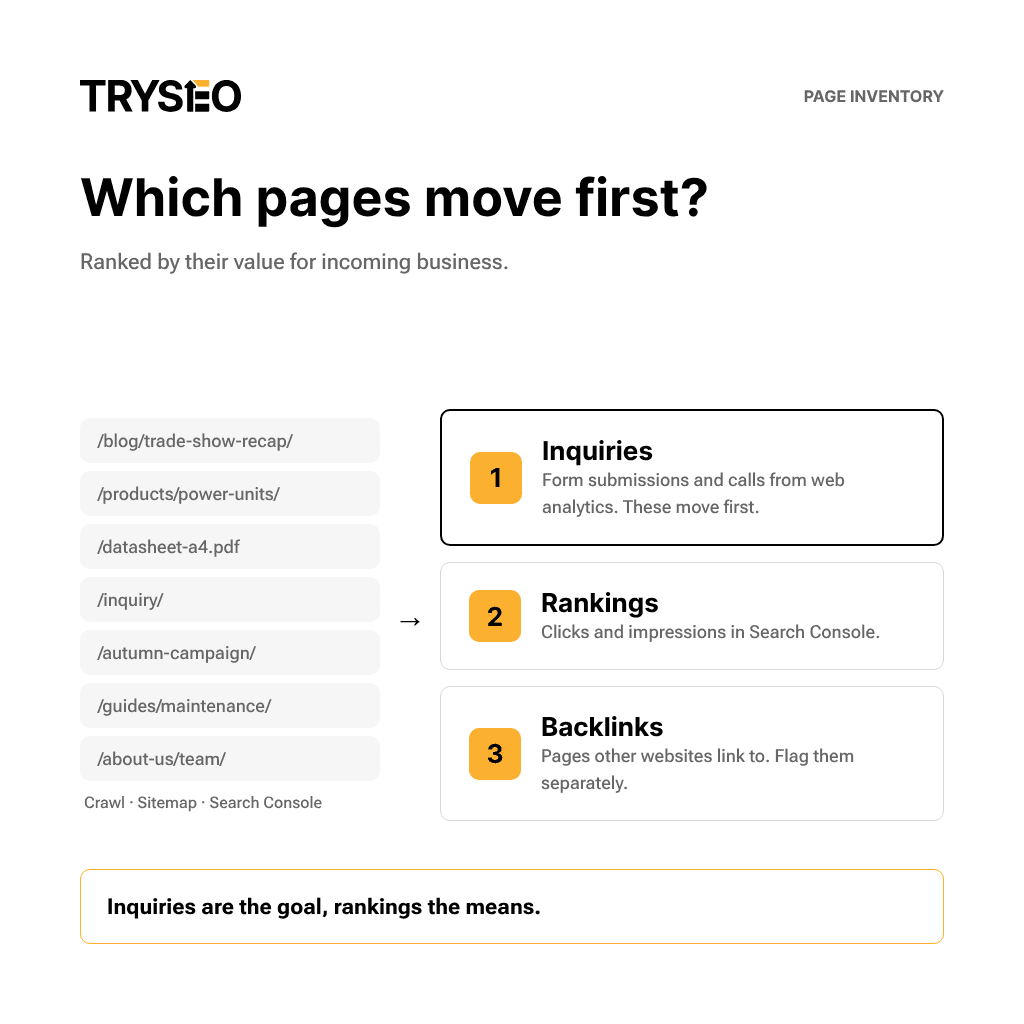
A comprehensive list of legacy URLs is generated by crawling the current website—using tools like Screaming Frog—and checking the XML sitemap. Supplement this with all pages recording impressions in the Search Console performance report. Don't forget files that are easily overlooked during migrations: spec sheet PDFs and legacy campaign landing pages.
In the second step, prioritize the list based on commercial impact:
- Inquiries: Which pages generate form submissions or phone calls? Your web analytics reveals this.
- Rankings: Which pages generate clicks and impressions in Google Search Console?
- Backlinks: Which pages do external websites link to, for instance according to Ahrefs?
Inquiries are the goal; rankings are the means. A page with low traffic that consistently generates leads takes priority during migration. A high-traffic blog post that yields zero inquiries comes second.
Document the baseline metrics for every page before the relaunch: inquiries, clicks, impressions, and ranking positions. Measure every post-launch change against these baselines.
Mark pages with backlinks separately. After the migration, reach out to the most important referring websites and ask them to update their links to the new addresses. Until then, the redirect will pass the link equity.
The inventory list is an excerpt from a full audit. To see what such an audit entails beyond the relaunch, check out our SEO audit tutorial.
Migrating content to the new website
Pages that generate inquiries must be migrated completely. This includes page titles, meta descriptions, and headings. In our project work, we often see the exact opposite: text gets shortened during a relaunch just to fit a new design. This risks stripping away the precise passages Google and answer engines could cite.
For every page on your inventory list, there are two clean paths: the page migrates with its content intact, or it merges into a relevant new page via a redirect. Deleting without a target is not an option.
Design adjustments are easily done without losing content. Long passages can be organized into tables (which AIs prefer anyway) or split across subpages. Using your inventory list, you should also assign a topic and its target keywords to every new page. This ensures no two pages compete for the same search query. The mapping will also reveal gaps—topics that don't have a dedicated page yet.
Make sure to migrate structured data as well. While not a strict requirement for AI answers in Google Search, it remains essential for Rich Results. You can find the fundamentals on title tags, headings, and content in our introduction to on-page SEO.
Keep in mind: What isn't written down cannot be cited by AI.
Rebuilding internal links
Internal links should point directly to the new URLs. This applies to body text links, navigation, and the footer. An internal link that routes through a redirect is an avoidable detour.
After going live, run a crawl to check if any internal links still point to legacy URLs. Update every match in your CMS to the new URL. Prioritize links from inquiry-generating pages to product pages and the contact form.
Securing AI visibility during a relaunch
For AI Overviews, the same fundamentals apply as for standard search. According to Google, a page doesn't need special qualifications for AI Overviews and AI Mode beyond standard search indexing. However, the page must be indexed and permitted to show text snippets.
What this means for your relaunch: an overlooked noindex or nosnippet left over from staging will also drop the page from AI Overviews and AI Mode. A deleted URL without a redirect falls out just the same.
Based on our project work, the same principle holds true for answer engines outside of Google: they can only cite content that is live and accessible on the site. An llms.txt file does not replace actual website content—and Google Search doesn't use these files anyway. To learn how content gains visibility in AI answers, read our article on visibility in LLM search.
301 redirects for every legacy URL
Every legacy URL with value needs a redirect. The destination should be the most contextually relevant new page. Google recommends permanent server-side redirects. Status codes 301 and 308 signal a permanent move. At the same time, the redirect sends a strong canonical signal for the future address.
JavaScript redirects are strictly a fallback. If rendering fails, search engines might never discover them.
Four rules apply to your 301 redirect map:
- Redirect every legacy URL directly to its destination—avoid redirect chains.
- Never bulk-redirect legacy URLs to the homepage. This can be flagged as a soft 404.
- Keep redirects in place for at least a year—ideally permanently for human visitors.
- After launch, test every address from the inventory list for status codes, destinations, and redirect loops.
Chains increase latency. On top of that, not every browser follows a long chain to its end. If you forget previous redirects during a second relaunch, you'll inadvertently create these chains.
To learn about redirect types and how to set them up on your server, check out our guide to redirects and SEO.
URL mapping: old URL, new URL
The URL mapping is the technical blueprint for your redirects. Before going live, it assigns each legacy URL its target destination. The easiest format is a spreadsheet with the old and new URL in each row, built directly from your inventory list of the legacy site's URL structure.
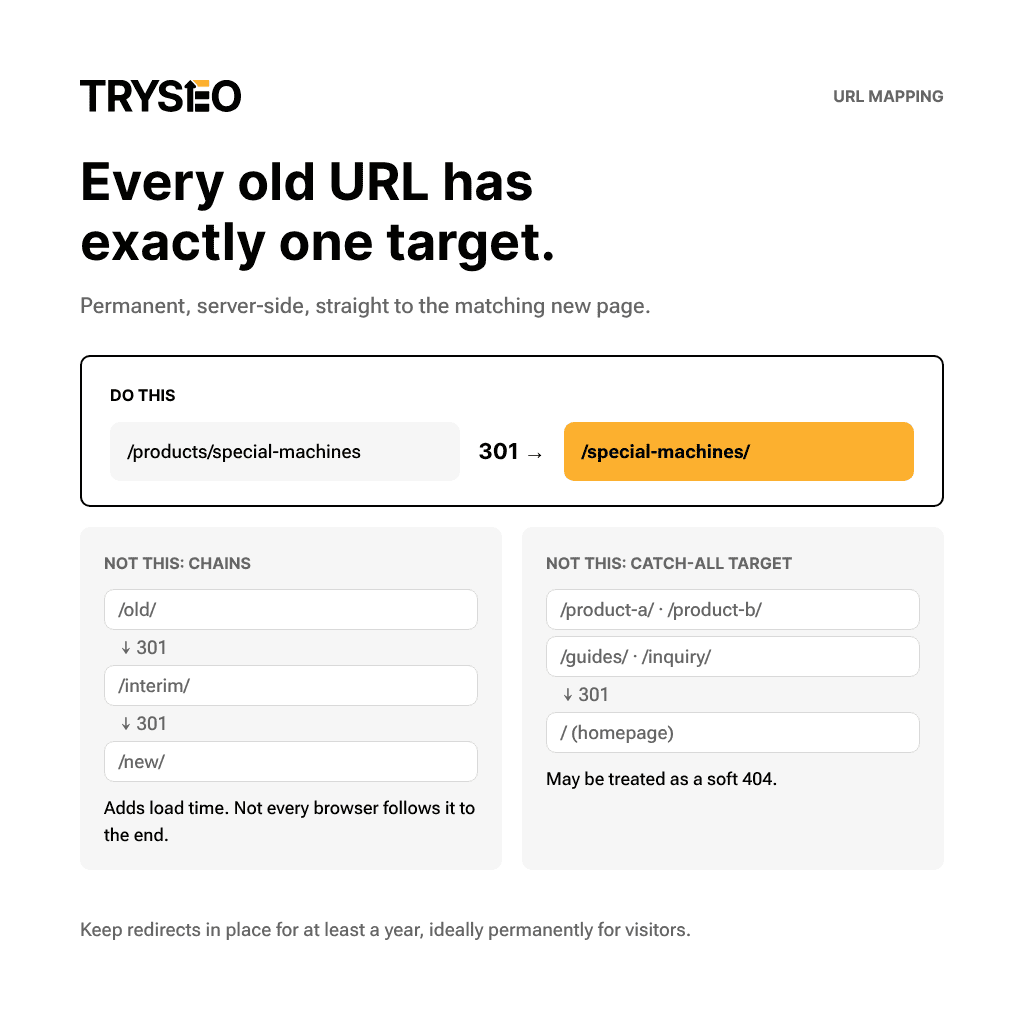
If an old page has no direct equivalent, identify which new page absorbs its topic. If your URL structure remains untouched, the mapping stays short. Only in very simple migrations can the list of legacy URLs be skipped entirely.
Domain migration using Change of Address
If your domain changes, you must submit an address change. Use the Change of Address tool in Google Search Console for this. It is specifically intended for moving to a different domain or subdomain—new subfolders on the same domain or switching from HTTP to HTTPS do not require it.
Before submitting, ensure the old homepage points to the new one via a 301 redirect. You also need verified ownership of both properties. When changing domains, submit the move for all verified variants of the old domain, including www and non-www.
The submission remains active for 180 days. Even so, keep the redirects live for at least a year.
Checking staging before going live
Before going live, check the new website just as Google sees it. The critical moment is when the staging environment turns into the live website. What made sense in staging will hurt your performance from this day on.
During development, password protection shields the staging environment far better than robots.txt. A page blocked via robots.txt can still end up in the index if other websites link to it. What's more: if robots.txt blocks a page, search engines won't see a noindex tag at all. At launch, remove all blocks that were only meant for the development phase.
Audit the title tags, meta descriptions, and status codes of your core pages from the inventory list while still in staging. Errors can be resolved there before they cost you rankings.
On launch day, check the following points:
- No noindex on pages meant to be indexed
- No blocking of the live website in robots.txt
- Canonical tags pointing to the new, full URLs
- hreflang tags pointing to the new, full URLs on multilingual websites
- An XML sitemap containing the new URLs, submitted in Search Console
- Tracking code and forms, ensuring you capture leads and inquiries from day one
Initially, the new sitemap won't show any indexed pages. That is completely normal. On multilingual websites, each language version must reference itself and all other language versions.
Mobile optimization is also part of the audit. Open the key pages from your inventory list on a smartphone and test-submit the contact form. Measure Core Web Vitals before and after launch using the exact same tool. How Google decides whether to index a page is explained in our article on indexing.
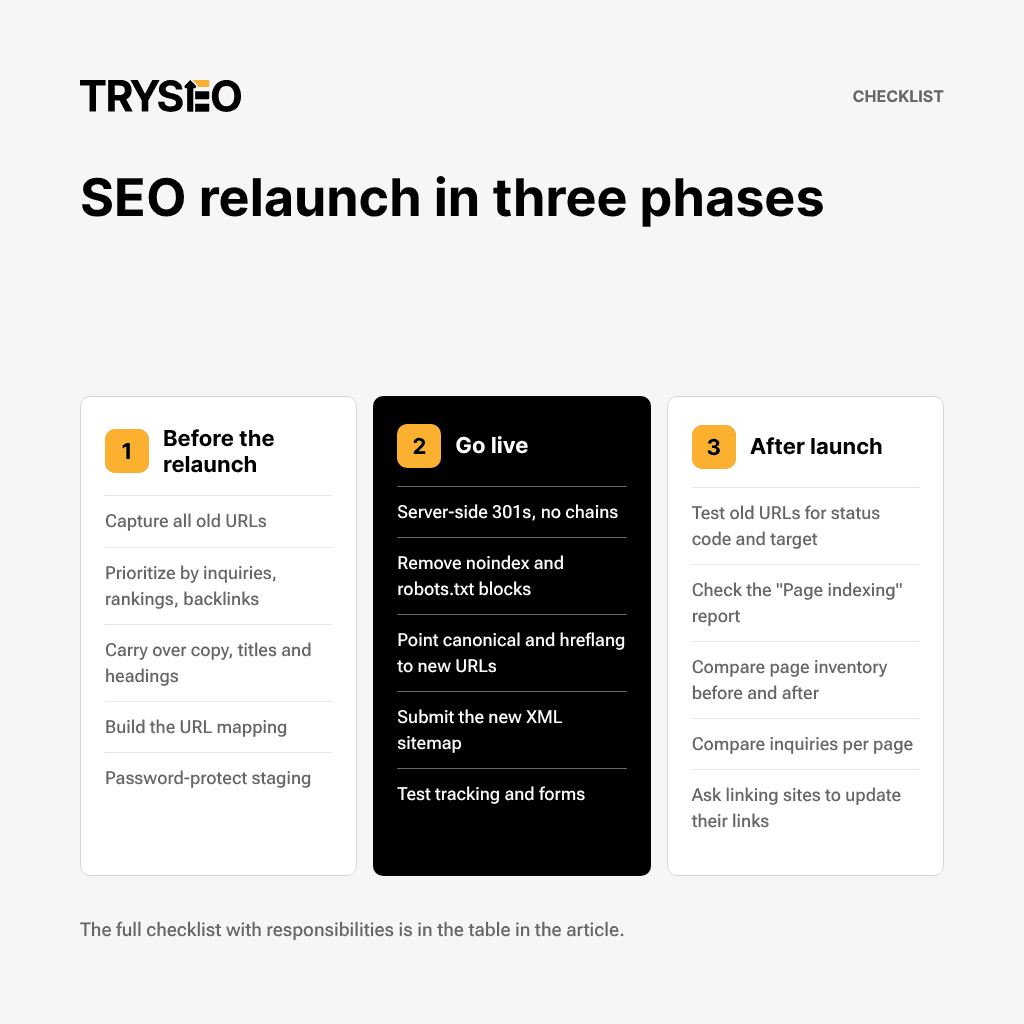
Three-Phase SEO Relaunch Checklist
The SEO relaunch checklist consolidates the checkpoints from this guide by phase, turning the relaunch into a project with clear milestones. Share it with your web agency and everyone responsible for sign-off. The “Who” column is a suggestion; define the exact allocation within your project team.
| Phase | Checkpoint | Who |
|---|---|---|
| Pre-Relaunch | Compile all URLs of the old website: Crawl, Sitemap, Search Console | SEO |
| Pre-Relaunch | Prioritize pages by leads, rankings, and backlinks | Marketing, SEO |
| Pre-Relaunch | Tag pages with backlinks | SEO |
| Pre-Relaunch | Decide for each page: migrate or consolidate with a redirect | Marketing |
| Pre-Relaunch | Migrate copy, title tags, meta descriptions, and headings for high-converting pages | Marketing, Web Agency |
| Pre-Relaunch | Migrate structured data | Web Agency |
| Pre-Relaunch | Create URL mapping: old URL to new URL | SEO, Web Agency |
| Pre-Relaunch | Password-protect staging environment | Web Agency |
| Go-Live | Implement server-side 301 redirects | Web Agency |
| Go-Live | Redirects without chains, no blanket redirects to the homepage | Web Agency |
| Go-Live | Remove development-phase noindex and robots.txt blocks | Web Agency |
| Go-Live | Point canonical tags and hreflang to new, full URLs | Web Agency |
| Go-Live | Update internal links to new URLs | Web Agency |
| Go-Live | Submit new XML sitemap in Search Console | SEO |
| Go-Live | Test tracking code and forms | Marketing |
| Go-Live | For domain migrations: submit Change of Address for all variants of the old domain | SEO |
| Post-Launch | Test all old URLs for status codes, redirect targets, and loops | SEO |
| Post-Launch | Check the “Page indexing” report for noindex, 404, and soft 404 errors | SEO |
| Post-Launch | Regularly monitor for unexpected crawl errors | SEO |
| Post-Launch | Performance report: compare inventory list pages before and after the relaunch | SEO, Marketing |
| Post-Launch | Compare leads per page against pre-relaunch levels | Marketing |
| Post-Launch | Reach out to key referring domains to update their backlinks | SEO |
| Post-Launch | Maintain redirects for at least one year | Web Agency |
No Traffic After the Relaunch?
If inquiries drop, troubleshooting begins with your inventory list. Compare its pages before and after the relaunch, prioritizing indexing and redirects. Fluctuations in the first few weeks following a migration are normal. Even so, keep a close eye on your highest-priority pages during this window. A sustained decline on specific pages is a clear warning sign.
Follow this troubleshooting sequence:
- Check the “Page indexing” report and crawl stats for any spike in new errors. The report identifies causes like noindex, 404, soft 404, or redirect loops.
- Manually test the most critical legacy URLs from your inventory list to verify their redirect targets.
- Compare the Performance report against an equivalent timeframe prior to the relaunch.
- Verify the status of the new sitemap in Search Console.
Ideally, traffic to the old URLs drops while traffic to the new ones climbs. If a new URL sees zero traction despite its predecessor generating inquiries, start your investigation right there. To understand specific Search Console notices, check out our guide on resolving GSC errors.
Identifying Ranking Losses in Search Console
Comparing time periods in the Performance report reveals where clicks have dropped off. Contrast a post-relaunch window with a comparable period before the migration. Aggregating by week or month helps smooth out day-of-the-week variations.
Next, alternate between the Queries and Pages tabs. This shows you exactly which page is losing clicks and ranking positions for specific search queries. For instance, suppose the legacy page “Custom Engineered Machinery” has lost its queries and the new page isn't picking them up. In that case, immediately inspect the redirect and the noindex status of that specific page.
Clicks from AI Overviews and AI Mode are included in the standard Performance report under the Web search type. Since late August 2026, a dedicated report has shown how often a site’s links appear in these AI features. It only appears once sufficient impressions are recorded. If data is available, compare pre- and post-relaunch figures here as well.
Do you need external relaunch support?
An SEO migration is an essential part of every website relaunch. The only question is who handles it. In our project work, we see a simple threshold: if the domain and URLs remain unchanged, the migration can often be handled internally using this checklist.
Google treats migrations without visible URL changes and migrations involving new addresses as two separate cases, each with its own guidelines. Even without new addresses, the crawl rate temporarily drops after a move. With new addresses, URL mapping, a redirect plan, and testing come into play.
Support starting from the concept phase pays off if any of the following apply:
- The URLs of many pages are changing.
- The domain is changing.
- The CMS is changing.
- The website has multiple language versions.
- Many pages currently generate leads.
- Internal teams lack the time to review staging from an SEO perspective.
The decisive factor comes down to one question: Who reviews redirects and indexing before launch, and who has scheduled time for it? If no one owns this, testing quickly becomes an afterthought on launch day. How we take on this role is detailed on our page for relaunch support for B2B websites.
Frequently asked questions about SEO relaunches
What is the most common mistake during an SEO relaunch?
From our project experience: old URLs without appropriate redirects. The old address then throws an error, and its backlinks lead to a dead end. Catch-all redirects to the homepage have a similar effect and can be flagged as soft 404s. Setting up a URL mapping before launch prevents both.
How long does it take for rankings to stabilize?
For small and medium-sized websites, a few weeks. According to Google, search results will then reflect the new URLs; for large websites, it takes longer. Rankings fluctuate in the meantime before settling down. There’s no fixed number of weeks. If an important page remains suppressed, check its redirect and indexing status.
How long do redirects need to stay active?
At least one year—and ideally permanently for visitors. During this time, all signals transfer to the new URLs. The change-of-address notification for a domain move is active for 180 days, but it doesn't replace 301 redirects. Don't remove them after six months.
Can I handle an SEO relaunch myself?
Yes, if the domain and URLs remain the same. In our experience, the checklist above and someone capable of auditing staging and Google Search Console are usually enough. If URLs, domain, or CMS change, the scope of URL mapping and testing increases significantly. When external support is worthwhile is covered in the section on external relaunch consulting.
How do I measure success after the relaunch?
By inquiries generated per page. The baseline is your inventory list prior to the relaunch, combined with date-range comparisons in the Search Console performance report. Clicks from AI Overviews and AI Mode are included there. How often your links appear in these AI features will be shown in a dedicated report once enough data is available.
Does a relaunch impact visibility in AI Overviews?
Yes, as soon as pages are no longer indexed. The same applies if snippets are no longer permitted. Only indexed pages eligible for snippet display can be considered for AI Overviews and AI Mode. There are no additional requirements. A forgotten noindex tag or a deleted URL will therefore also remove the page from these AI answers.
Conclusion: Protect existing assets, measure inquiries
Your inventory list determines the success of your relaunch. Knowing which pages generate inquiries before the SEO relaunch allows you to migrate them with their content, redirects, and tracking intact. Launch day then becomes the springboard for new leads. See our services page to find out how we support a website relaunch with SEO migration.
Send us your relaunch date. We'll review your Search Console data and tell you which pages cannot be lost during the migration. Reach out via our contact form.

