


Do you run a large website with hundreds or thousands of subpages and have problems indexing your content?
Then it could be that you have difficulties with the crawl budget.
You can find out exactly what this is and how you can optimize it in this article.
What is the "crawl budget"?
The crawl budget defines the number of pages that search engines crawl and index on your website within a certain period of time. It represents the time quota that search engine crawlers dedicate to your website, so to speak.
The crawl budget is made up of two main factors:
Crawl limit/host load: This factor refers to the technical capacity of your website to process crawler requests. Google does not want to overload websites and therefore adjusts the crawl intensity accordingly. Factors such as server performance, loading times and error rates play a decisive role here.
Crawl demand/crawl planning: This is about the relevance and priority of your pages from the search engine's point of view. Pages with higher authority (through internal and external links), regular updates and higher popularity are crawled more frequently.
Search engines determine the crawl budget of a website based on various factors, including
- The popularity of the website, measured by backlinks and user interactions
- The frequency of content changes and updates
- Server performance and response times
- The quality of the content and its uniqueness
- The structural integrity of the website (errors, redirects, etc.)
Incidentally, websites that are hosted on a shared host share the host's crawl budget. This can lead to restrictions, especially with inexpensive shared hosting offers.
When is the crawl budget relevant for me?
If you run a smaller website, you can stop here. Then the crawl budget will not play a role.
It only becomes important for larger websites with several thousand URLs. The more extensive a website is, the more likely it is that the crawl budget will become a limiting factor. E-commerce platforms with thousands of product pages, variants and filter options are particularly at risk here.
Common causes of crawl budget waste
URLs with parameters and crawler traps: Dynamically generated URLs with numerous parameters, such as those often found in filters or sorting options in online stores, can lead to a virtually unlimited number of URLs. These "crawler traps" can devour a large part of your crawl budget.
Duplicate content: If similar or identical content is accessible under different URLs (e.g. through different domain variants such as www/non-www or HTTP/HTTPS), Google wastes valuable crawl budget by crawling redundant content.
Low quality content: Pages with little added value, such as thin content or automatically generated pages, consume crawl budget without offering significant SEO benefits.
Faulty and redirecting links: Every faulty link or redirect costs crawl budget. Redirect chains (several consecutive redirects) are particularly problematic.
Incorrect entries in XML sitemaps: If your XML sitemap contains incorrect URLs, non-indexable pages or redirects, this leads to inefficient crawling.
Slow loading times and timeouts: Slow server response times mean that crawlers need more time for each page, which reduces the number of pages crawled.
High number of non-indexable pages: If many pages with noindex tags or areas blocked in robots.txt are accessible to crawlers, crawl budget is wasted.
Inadequate internal link structure: Poor internal linking can lead to important pages receiving too little crawling attention, while less important pages are crawled disproportionately often.
Analysis of the current crawl budget
Before you take optimization measures, you should analyze your current crawl budget. Various tools are available for this purpose:
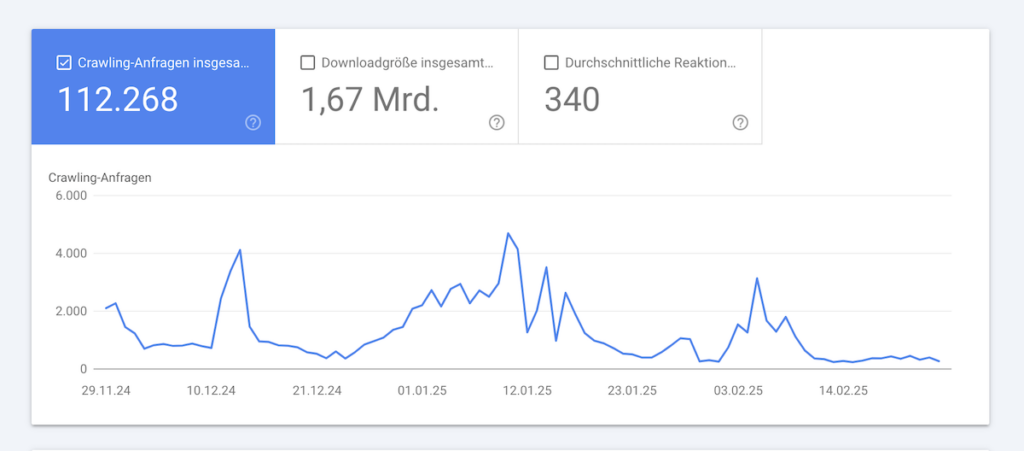
Google Search Console (GSC): In the GSC, under the menu item "Crawling", you will find statistics on how often and how many pages of your website are visited by Googlebot. This data provides an initial insight into the crawl budget.
Server log file analysis: You can obtain the most detailed information by analyzing your server log files. Here you can see exactly which pages are visited by which crawlers and how often. Tools such as Screaming Frog Log File Analyzer or Botify can make this analysis much easier.
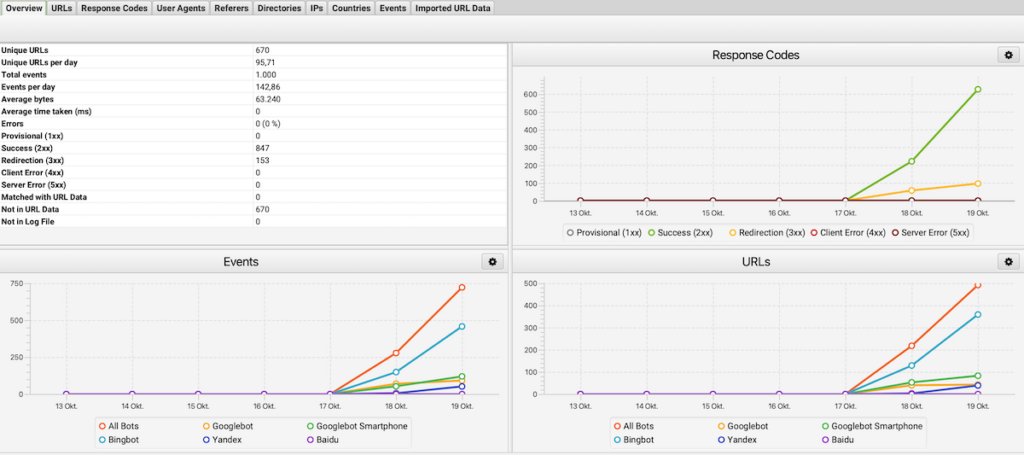
The following metrics are of interest in the analysis:
- The average number of pages crawled daily
- The distribution of crawling to different page areas
- Patterns and regularities in crawling behavior
- Pages that are crawled very frequently or very rarely
- Errors and redirects that occur during crawling
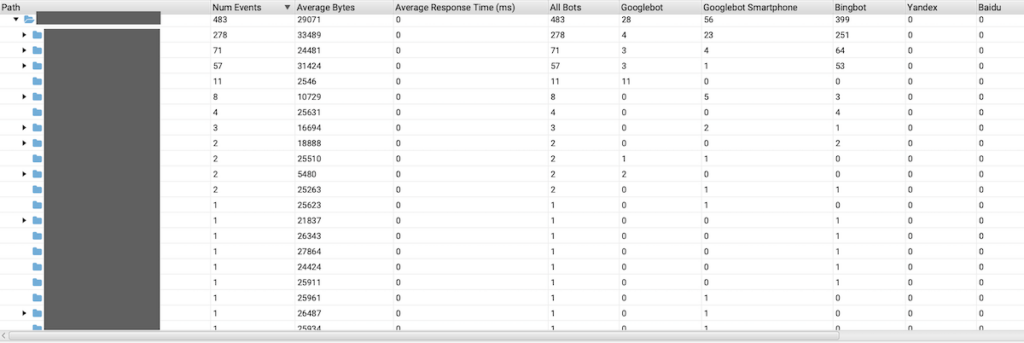
Problems with the crawl budget are often indicated by:
- Large discrepancies between the number of your pages and the number of crawled pages
- A high proportion of errors or redirects in the crawling statistics
- Long periods of time between adding new pages and indexing them
- Uneven distribution of crawling (e.g. certain areas are neglected)
Measures to optimize the crawl budget
Technical optimization measures
Use of robots.txt to control crawling & block URLs with parameters
Define in robots.txt which areas of the website should not be crawled by search engines. For example, you can prevent access to admin areas or test pages:
User-agent: *
Disallow: /admin/
Disallow: /test/
Avoid crawling URLs that contain dynamic parameters by defining corresponding rules in robots.txt. Example:
User-agent: *
Disallow: /*?sort=
Keep sitemap up to date
Create a clear XML sitemap that only contains relevant URLs. Make sure that the sitemap is regularly updated and submitted to Google Search Console.
Note: Only edit your robots.txt if you understand what you are doing here. In the worst case, you will block the crawling of important website areas. If in doubt, get an expert to help you.
Increase in loading speed
Optimize images, compress files and use modern formats (e.g. WebP) to reduce loading times.
Optimize server resources
Check your server utilization and make sure that sufficient resources are available. A scalable hosting solution or the use of managed hosting services can help here.
Implement caching strategies
Use browser and server caching to efficiently serve recurring requests.
Reduction of JavaScript and CSS
Minimize the use of excessive JavaScript and CSS by removing or merging unnecessary scripts. Tools such as CSS Minifier or UglifyJS can help you with this.
CDN use to reduce the load on the server
Integrate a Content Delivery Network (CDN) to deliver static content such as images, videos and scripts from a globally distributed network. This reduces the server load and improves loading times, especially for international users.
Content optimization measures
Fixing duplicate content
Use canonical tags (<link rel="canonical" href="https://www.beispiel.de/seite">) to identify duplicate content. Remove superfluous variants and introduce 301 redirects for merged pages.
Improvement of the internal link structure
Link important pages prominently within the website. Set descriptive, keyword-rich anchor texts.
Implementation of a flat website architecture
Reduce the click depth by linking main categories directly from the homepage. A flat architecture means that deeper pages can also be reached in just a few steps. This makes it easier for the crawler to find and index content.
Avoidance of orphan pages
Also make sure that each page has at least one internal link. You can also find currently orphaned pages with Screamingfrog or SEO suites such as SEMrush.
Summary
Crawl budget optimization is an often overlooked but crucial aspect of technical SEO for larger websites. By specifically improving the technical foundations, removing crawl obstacles and strategically prioritizing important content, you can ensure that search engines crawl and index the most valuable parts of your website efficiently.
A systematic implementation plan for crawl budget optimization should include the following steps:
- Analysis: Capture the status quo through log file analysis and GSC evaluation
- Troubleshooting: Elimination of technical problems and crawling obstacles
- Structural improvement: Optimization of the website architecture and internal linking
- Performance optimization: Improvement of server performance and loading times

