


Summary: B2B website relaunch
- A B2B website relaunch improves website design, SEO, user experience, content structure, and lead generation performance.
- Poor website relaunch planning can lead to major SEO traffic losses, broken pages, and reduced search engine rankings.
- Companies should analyze existing website performance before relaunching to protect high-performing pages and valuable SEO assets.
- Proper 301 redirects, technical SEO optimization, and URL mapping are essential during website migration.
- Continuous testing and post-launch monitoring help identify technical issues, ranking drops, and conversion problems quickly.
- CMS like WordPress are recommended because they support SEO flexibility, scalability, integrations, and AI-powered workflows.
If you are planning to redesign or comprehensively update your website, a thorough relaunch is essential. Search engine optimization (SEO) plays a crucial role in ensuring that your site continues to be found well in search engines even after extensive changes.
An effective website relaunch can strengthen your online presence and ensure that you reach your target group even more effectively.
"A bad B2B website is a cost factor. A good B2B website is a lead machine." Hannes Kaltofen
However, a website relaunch also involves risks. Without a proper strategy, mistakes can quickly be made that can undo your previous SEO successes.
The potential stumbling blocks range from neglecting valuable content that already ranks well to technical errors that can affect the accessibility of your website.
In this article, we take a closer look at the most common mistakes that can occur during a B2B website relaunch and give you tips on how to avoid them.
Free checklist: Get our >
Website relaunch SEO checklist
< incl. Template for a migration map
(Simply create a copy of the sheet for editing)
What is a website relaunch?
A website relaunch is the complete redesign of a website. The process may include updating the website’s content, design, functionality, and technology to enhance user experience, performance, and engagement.
In most B2B companies, it includes a complete modernization of the website structure, content, technical SEO setup, and often a migration to a new content management system (CMS).
The goal of a relaunch is not only to improve design but also to create a faster, scalable, and conversion-focused platform that aligns with the company’s business objectives.
Would you also like to optimize your company website for AI and become visible there?

Find out more about our services!
What are the 6 common mistakes companies make during website relaunch?
B2B website relaunches showed major SEO failures, including the removal of high-performing pages, lack of SEO planning, and no technical foundations.
As James Norquay of Prosperity Media wrote on LinkedIn, that lack of SEO results in significant organic traffic losses of up to 80%.
In next section, we will discuss these 6 mistakes and what steps you can take to avoid them during the website relaunch.
1. Inadequate planning and objectives
The success of a website relaunch depends largely on thorough preparation and clear objectives, especially for SEO.
A strategic approach is essential to ensure that the relaunch not only improves the visual and functional quality of the website but also maintains or even increases its visibility in search engines.
Start with a complete website analysis
Before starting a B2B website relaunch, companies should conduct a detailed analysis of the existing website. A relaunch is not only about introducing a new design or CMS, but also about understanding what currently works and what needs improvement.
Few important questions to ask before:
- Which pages generate the most traffic and conversions?
- How strong is the current SEO performance?
- How does the website compare with competitors?
- What do key metrics such as visitor numbers, bounce rates, and dwell time reveal?
This analysis helps identify weaknesses in user experience, content structure, and search visibility before major changes are implemented.
Benchmarking competitors can also reveal opportunities for improvement in areas such as content quality, lead generation, navigation structure, and keyword targeting. Understanding how competitors position their services and guide users through the customer journey can provide valuable insights for the relaunch strategy.
The importance of clearly defined SEO goals
Clearly defined SEO goals set the direction in which all changes and optimizations should be made during the relaunch.
These goals should be based on a thorough analysis of current SEO performance and aim for realistic improvements.
Without such goals, you could overlook essential aspects such as keywords, user experience or mobile optimization, which are crucial for maintaining or improving your search engine rankings.
Tips on how to effectively set goals and align the relaunch with them
- Analysis of the status quo: Start with a detailed analysis of your current website. Understand which pages rank well, which content generates the most traffic and which technical aspects need to be improved.
- Define SMART goals: Set specific, measurable, achievable, relevant and time-bound (SMART) goals for your SEO relaunch. For example, a goal could be to halve the page loading time or to increase the number of visits to a particular landing page by 30%.
In B2B relaunch projects, planning must include revenue and pipeline alignment. This means defining how the new website will support lead generation targets, sales funnel conversion rates and CRM integration workflows. - Involve stakeholders: Ensure that all relevant team members and decision makers are involved early in the planning process to integrate their perspectives and expertise. This not only promotes a shared understanding of the objectives of the relaunch, but also of the steps required to achieve them.
- Ongoing adjustments and tests: Set milestones and regularly check progress in relation to SEO goals. Be ready to adapt your strategy based on the results of A/B tests and user feedback.
2. Neglecting existing SEO values
Your existing websites may have built up SEO value over the years through carefully curated content, inbound backlinks and constant user interaction.
In B2B environments, this SEO value is often concentrated in high-performing service pages, industry-specific landing pages, case studies, and blogs that support long sales cycles and lead generation funnels.
These sites have proven that they are successful in the search engines. Simply neglecting them or changing them without strategic consideration can lead to a significant loss of visibility and traffic.
It is therefore crucial to maintain these successes during a relaunch.
A CMS like WordPress maintains these assets during restructuring without losing SEO. When combined with content migration workflows and AI-assisted content audits, AI-driven SEO reduces the manual workload involved in a B2B website relaunch (Ludington 2026).
Read: The Best B2B SEO Agencies in Germany: 10 Top Agencies in Direct Comparison by Raebricht (2025).
How to ensure that successful SEO elements are not lost
- Perform a content audit: Start with a thorough audit of your current website. Identify which pages attract the most visitors, which have the highest conversion rates and which rank for valuable keywords. These pages should have priority in a relaunch.
- Record SEO metrics: Document the current performance of all important pages in terms of rankings, traffic volume and other relevant SEO metrics. This data serves as a benchmark for comparing performance after the relaunch.
- Weigh up content changes carefully: If you also want to change the content of existing pages, you should carefully consider whether this makes sense for pages with good rankings. Never change a running system and all that.
- Apply a correct redirect strategy: If the URLs are changed, it is essential to implement correct redirects. You can find out how to do this in the next paragraph.
Take the opportunity for a content spring clean too
A website relaunch offers the perfect opportunity to thoroughly review and optimize existing content. It's not just about improving SEO, but also about rethinking the entire content strategy.
It is an opportunity to identify content that is not performing as desired and decide whether it should be improved or removed.
Non-performing content can be identified through a detailed analysis that looks at the number of hits, time spent on the page and conversion rates.
This is particularly quick with the SEO Spider from Screamingfrog. Use the API access for the Google Search Console for this purpose:
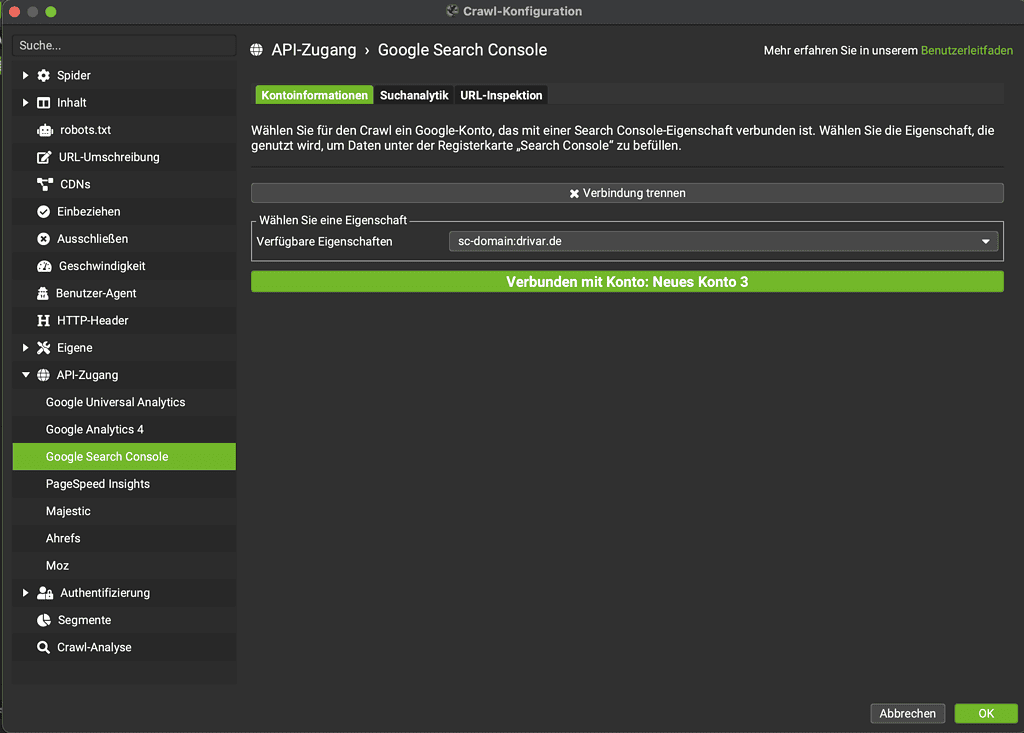
Log in with the respective Google account and select the corresponding GSC property.
You can then quickly get an overview of the performance of the URLs with a crawl:
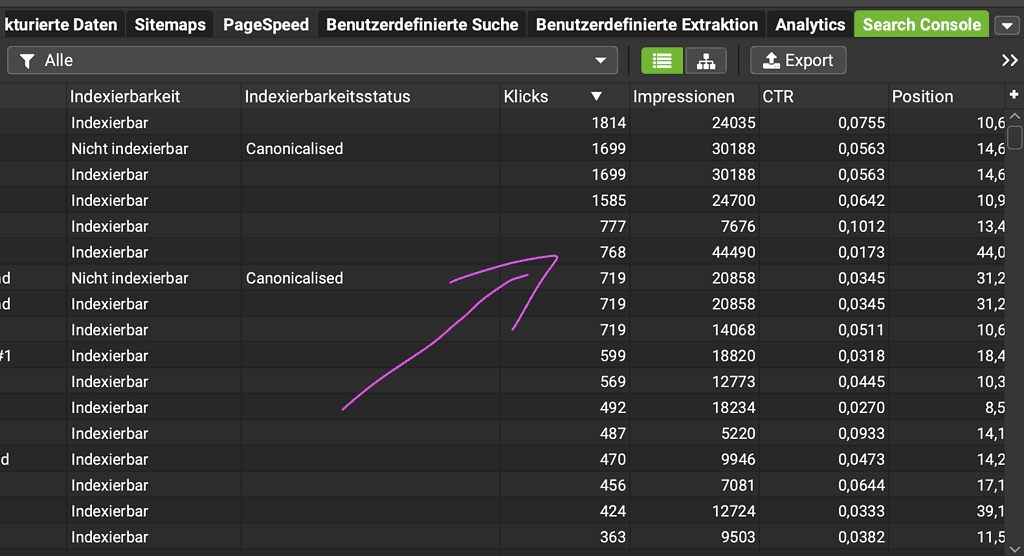
Content that generates little to no traffic could either be reworked to be more relevant and appealing to the target audience, or it could be removed to streamline the site and improve user navigation.
When revising content, current SEO best practices should be considered, including using relevant keywords, improving readability and providing value to readers.
By removing such content and restructuring the remaining content, a clearer, more targeted and more user-friendly website can be created.
3. Incorrect implementation of redirects
One of the most common and at the same time most critical sources of error during a website relaunch is the incorrect implementation of redirects. This can lead to 404 errors, which not only negatively impact the user experience, but also damage the SEO performance of the website.
The role of 301 redirects in an SEO relaunch
301 redirects are permanent redirects that serve to redirect search engines and users from an old URL to a new one. As is often the case with a relaunch.
If a URL is changed during a relaunch, a 301 redirect should be used to ensure that users and search engines are directed to the correct content and no "page not found" errors occur.
URL changes are especially sensitive because individual pages often carry high-intent traffic and direct conversion value. Losing a single high-performing service page can directly reduce qualified inbound leads.
Instructions for the correct implementation of redirects
The correct implementation of 301 redirects is essential to avoid SEO problems after a relaunch. Here are practical steps and examples of correct handling:
- Create URL mapping: Before the relaunch, you should create a detailed mapping of all old URLs to the new URLs. This serves as the basis for setting up the forwarding.
- Set up redirects in the .htaccess file: Example: Suppose you have an old URL www.beispiel.de/alte-seite and the new URL is www.beispiel.de/neue-seite. The redirect in the .htaccess file on an Apache server could look like this:
Redirect 301 /alte-seite /neue-seite
This entry ensures that visitors and search engines are redirected from the old site to the new one. - Test redirects: Once the redirects have been set up, it is important to test them. Check that all old URLs redirect correctly to the corresponding new URLs and make sure that no redirect loops or incorrect redirects occur.
- Monitoring after the launch: You should also monitor the performance of the URLs after the redirects have been implemented. Tools such as Google Search Console can help to quickly identify and fix errors such as 404 pages.
Tip: You can also find a template for a migration map in our free website relaunch SEO checklist
4. Ignoring technical SEO factors
The success of a website relaunch depends not only on content and design, but also on a number of technical aspects that are often overlooked.
Careful checking of URLs, meta data and internal links is crucial to avoid technical SEO problems, which can otherwise lead to serious problems after the relaunch.
Checking URLs, metadata and internal links
- URLs: Every URL should be cleanly structured, free of unnecessary parameters and optimized for search engines. It should retain the relevant keyword integration and remain clear. More on this in a moment.
- Meta data: Meta titles and descriptions are crucial for the click-through rate in search results. They must be precise, contain relevant keywords and accurately reflect the content of the page.
- Internal links: These not only contribute to SEO, but also to user guidance on the page. A careful check ensures that all internal links function correctly and are logically structured to optimize the user experience and internal link power. Don't forget existing internal links!
- Security aspects: Check all security aspects, including SSL certificates and HTTPs status.
- Robots.txt and sitemap: Make sure that the Robots.txt file is configured correctly and that the sitemap is up-to-date and transmitted to search engines without errors.
What a well-structured URL looks like and why it is important?
A well-structured URL is clear, concise and informative. It should contain important keywords that reflect the content of the page and have a logical structure that facilitates navigation and understanding of the website hierarchy for both users and search engines.
Good URLs are crucial for SEO as they help search engines understand the context of the page and index it accordingly. They also improve the user experience by being easy to read and remember.
How to optimize the URL structure to improve SEO and user experience?
- Use speaking URLs: Integrate relevant keywords that describe the content of the page.
- Keep URLs short and concise: Avoid unnecessarily long URLs and complex parameters that could impair readability.
- Use hyphens to separate words: Hyp hens are accepted by default to separate words in URLs and improve readability.
- Avoid unnecessary repetition: Make sure that URLs do not contain redundant or irrelevant words.
- Structure URLs hierarchically: Organize your URLs in a logical hierarchy that reflects the structure of your website and makes it easier for search engines and users to navigate.
URL changes are naturally a good idea in the course of a relaunch, insofar as there is currently potential for optimization. But don't forget the redirects!
5. Inadequate testing and quality assurance
Comprehensive testing before publishing a new website is essential to identify and fix technical errors, design problems and usability issues.
They ensure that all functions work as intended and that the website is displayed correctly in different browsers and on different end devices.
Thorough testing helps minimize the risk of SEO damage from technical flaws and ensures a positive user experience from day one.
Examples of test procedures and tools that can help with this
- Browser compatibility tests: Tools such as BrowserStack or CrossBrowserTesting make it possible to check the appearance and functionality of the website in different browser environments.
- Mobile responsiveness tests: Tools such as Lighthouse show whether the website is easy to use on mobile devices.
- Speed tests: Tools such as Google PageSpeed Insights or GTmetrix analyze the loading speed of the website and provide recommendations for improvement.
For B2B relaunch, testing must prioritize conversion systems. This includes:
- CRM form submissions (HubSpot, Salesforce, etc.)
- lead routing and automation workflows
- multi-step funnel behavior
- demo request and consultation booking flows
A functional website must ensure end-to-end revenue flow continuity.
Read article "Why the Company Website Determines Revenue Today, Not Sales" (Raebricht 2026).
6. Lack of monitoring after the launch
After a website relaunch, it is crucial to continuously monitor performance to ensure that the website is working as expected and having a positive impact on rankings and traffic. This includes monitoring traffic, conversion rates, search engine rankings and user feedback.
Monitoring should not be limited to traffic and rankings. It must also include:
- lead quality tracking
- conversion-to-opportunity ratio
- cost per lead (CPL)
- sales-qualified lead (SQL) performance
This ensures that SEO performance is directly connected to revenue outcomes.
Tools and techniques for monitoring and rapid troubleshooting
- Google Analytics: Provides comprehensive data on website traffic and user behavior. (It is easy to forget the correct migration of the tag here).
- SEO Spider Screaming Frog: Ideal for creating the migration map, evaluating existing pages and actually all on-page tasks.
- Google Search Console: Helps to understand the visibility of the website in search results and shows how the website is crawled by Google.
- Heatmapping tools such as Hotjar or Mouseflow: Provide insights into how users interact with the new website and help to identify usability problems.
Short outages are common during migration but should be resolved quickly.
What is content management system?
A CMS is the platform used to build, manage, and update a website without directly coding every page. In a website relaunch, the CMS plays a central role because it determines how easily content can be migrated, optimized, and scaled.
In this table we summarized the commonly used CMS.
| CMS / Platform | Key Description |
|---|---|
| WordPress | Most widely used open-source CMS (~18 million installations). Originally built for blogging, now extended into a full CMS using plugins and extensions. |
| TYPO3 | Enterprise-focused CMS, especially popular in German-speaking regions. Commonly used for large company portals and e-commerce platforms. |
| Joomla | Second-largest CMS provider. Suitable for beginners and advanced users. More complex than WordPress but offers many built-in CMS features. |
| HubSpot | Not a traditional CMS but an all-in-one marketing and sales platform. Includes website management, analytics, and tools without needing extra plugins. |
How to choose the right CMS?
CMS selection in a relaunch is a strategic decision. It depends on your website’s goals, required features, and long-term business needs (Hilliard 2026).
Consider following points before choosing CMS;
- Define Your Website Requirements: Start by identifying what the new website needs to achieve. Consider both technical and functional requirements such as:
- Content management capabilities
- SEO functionality
- E-commerce support
- Integration with third-party tools
- Multilingual support
- Scalability and customization options
- Prioritize Ease of Use: A CMS should simplify day-to-day website management. While most systems can be learned relatively quickly, some are more user-friendly than others. A simple interface reduces training time and allows teams to manage content efficiently without extensive technical expertise.
- Evaluate Security and Updates: Make sure the platform receives regular updates and that security vulnerabilities are identified and fixed quickly. This is especially important for websites handling sensitive customer or business data.
- Test the CMS Before Choosing: If possible, test the CMS before making a final decision. Many platforms offer demos or trial versions that allow you to explore their features. Testing helps determine whether the CMS meets your operational needs and whether your team can work comfortably with the system.
- Compare Multiple CMS Options: Instead of choosing the first available option, create a shortlist of potential CMS platforms and compare them based on:
- Features and functionality
- User experience
- Security
- Flexibility
- Cost
- Maintenance requirements
- Work With Experts if Needed: If you are working with a web agency, you can ask them to assess and compare different CMS solutions for your project. Their technical expertise can help identify the best platform based on your business requirements and future growth plans.
Read Steffen Raebricht checklist for evaluating a strong B2B marketing agency.
From strategy to execution: Why TRYSEO recommends WordPress?
At TRYSEO, we recommend WordPress as the primary CMS for B2B website relaunches because it provides:
- Full control over SEO structure with built-in optimization capabilities
- Flexible, user-friendly content management for internal teams and agencies
- Strong ecosystem of plugins and integrations for extended functionality
- Scalable architecture for complex multi-page B2B websites
- Independence from locked enterprise CMS systems and vendor restrictions
- Lower operational costs and faster campaign and landing page launches
WordPress and AI in website relaunch
Modern B2B relaunches increasingly use WordPress combined with AI. Ludington (2026) highlights the benefits of using AI CMS:
- Consistent brand voice through AI-enforced style and tone guidelines across all teams
- Scalable personalization with dynamic content delivery without manual segmentation
- Data-driven content strategy supported by predictive analytics for better decisions
- Reduced operational costs by automating repetitive tasks and manual workflows
- Improved content discoverability through automated SEO and metadata optimization
- Stronger compliance through AI guardrails and transparent audit trails
- Faster time-to-market with streamlined content creation and publishing workflows
This significantly reduces relaunch time while improving SEO consistency.
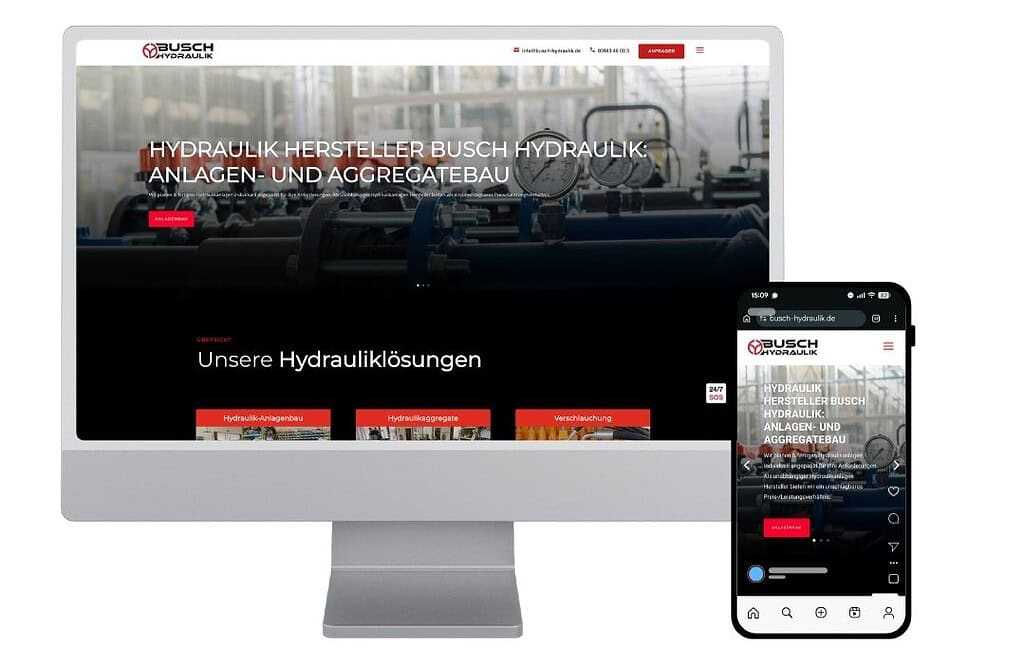
An example of this approach can be seen in B2B implementations in Busch Hydraulik. Their website is structured not only for users but also for search engines and AI systems. This enables consistent visibility among decision-makers actively searching for solutions. The result is a system that generates qualified inbound inquiries from ideal customers in a structured way rather than relying on chance visibility.
Read our success stories.
What is the cost of website relaunch?
The cost of B2B website relaunch varies and depends on various factors. These factors include CMS platform migration, custom integrations, content migration, custom UX/UI design, and AI personalization requirements.
Price range also varies if a B2B website relaunch id done
- by company itself or you get it from an agency
- relaunch involves complex functions
- budget size for realunch
AT TRYSEO, we offer fixed prices. Website relaunch costs typically range from €5,000 for smaller websites to €30,000 or more for larger, more complex projects.
Conclusion: Execute a seamless website relaunch
Your company is doing great work, but if it does not communicate well through the website, this will cost you every day.
In B2B contexts, the risks are higher because websites are directly connected to revenue pipelines. Losing SEO value, breaking conversion paths, or mismanaging redirects can directly impact lead generation and sales performance.
This is why the success of a relaunch depends on three critical factors:
- protecting existing SEO equity through structured migration and redirects
- ensuring technical stability and continuous monitoring after launch
- choosing a CMS that supports long-term scalability and independence
At TRYSEO, we recommend WordPress as the foundation for B2B website relaunches because it combines flexibility, SEO control, and operational independence for both internal teams and external agencies. When combined with modern AI capabilities, it becomes a scalable system for content, SEO, and campaign execution.
Ultimately, successful B2B relaunches are not defined by visual improvement alone, but by how effectively they preserve performance while enabling faster, more intelligent growth after migration.
FAQs
1. What is the biggest mistake companies make during an SEO relaunch?
The biggest mistake is neglecting 301 redirects and not paying enough attention to content and keywords. These errors can lead to considerable losses in ranking and traffic.
2 How long should an SEO relaunch take?
The duration of an SEO relaunch can vary greatly depending on the size of the website, the complexity of the planned changes and the scope of the preparatory measures.
In general, you should allow several months: one month for planning, two to three months for implementation and at least one month for monitoring and readjustment after the relaunch.
3. What role does the Google Search Console play in the SEO relaunch?
The Google Search Console is an indispensable tool that provides insights into the performance of your website, highlights problems and enables you to improve the visibility of your website.
It helps to identify crawling errors, monitor indexing, analyze search traffic and check the implementation of 301 redirects. See also here: The most common GSC errors & their solution.
4. Can I carry out an SEO relaunch without an SEO agency?
Of course, it is possible to carry out an SEO relaunch without external help, especially if you or your team have sufficient knowledge in the areas of web development, SEO and content strategy. If not, it's better to play it safe with external support.
5 How do I measure the success of my SEO relaunch?
The success of an SEO relaunch can be measured using several KPIs, including positioning in the search results (rankings), organic traffic, dwell time, bounce rate and conversion rate.
Data collected before and after the website relaunch provide the basis for a direct comparison. Tools such as Google Search Console and Google Analytics are indispensable for analyzing and evaluating the results.
Would you also like to optimize your company website for AI and become visible there?

Find out more about our services!
References
- Hilliard, F. (2006). “How to choose the right CMS: Take the guesswork out of your CMS search.” SiteCore: How to Choose the Right CMS | Sitecore
- Ludington, L. (2026). “What Is an AI CMS? How Artificial Intelligence Is Changing Content Management.” WordPress: https://wpvip.com/blog/ai-cms/
- Raebricht, S. (2026). “Trust in B2B Purchasing: Why the Company Website Determines Revenue Today, Not Sales.” TRYSEO: Trust in B2B: Company Website as Gateway to Relationships

